
A console window kept flashing on my screen. A dark rectangle, a fraction of a second, gone. Every so often, no pattern I could pin down.
I tried to catch it. Task Manager wasn’t fast enough. Event logs told me that something ran, sometimes, but never handed me the actual script. On a managed Windows machine, that’s the norm: logon scripts, config-management agents, scheduled tasks, and remote-management tooling shell out to PowerShell and cmd dozens of times a day, usually with no window, usually gone in milliseconds, occasionally as a base64 blob you couldn’t read even if you caught it.
None of it is sinister. Most of it is patch management and compliance checks doing exactly what they should. But “probably fine” is a strange thing to accept about code you can’t see. I wanted to read it.
So I built script-warden: a single Windows executable that records every script launch, keeps a copy of the actual script, and lets you browse the whole trail in a local web viewer. It’s open source (MIT), and this post is about the itch and the one genuinely clever trick that makes it work.
The Observability Gap
The problem was never that scripts run. It’s that they run and disappear.
The requirements more or less wrote themselves:
- Record every launch of the usual interpreters:
powershell.exe,pwsh.exe,cmd.exe,cscript.exe,wscript.exe. - Keep the actual script: copy referenced
.ps1/.bat/.cmd/.vbs/.jsfiles, save inline-Command/cmd /ctext, and decode-EncodedCommandpayloads into something readable. Everything content-addressed and de-duplicated by SHA-256. - Note whether each ran Visible (had a console) or Hidden (no window / background), because the silent ones are exactly the ones you want to see.
- Capture the full parent chain, so you can trace a launch from the script up to the scheduled-task host or management agent that started it. It reads SYSTEM-level data too, so scripts that ran with full privileges show up.
- Never, ever break the thing it’s watching. If the audit logic throws, PowerShell must still run.
That last point turned out to shape the whole design.
The One Clever Trick
How do you sit in front of every PowerShell launch on a machine with no kernel driver, no OS patching, and no fragile global hook?
Windows has a decades-old debugging feature called Image File Execution Options (IFEO). Register a Debugger value for an executable name, and from then on, whenever Windows is asked to launch powershell.exe, it instead launches your program with the original PowerShell command line handed to you as arguments. It’s the same supported mechanism used to attach a debugger at process start. script-warden registers itself as that debugger.
That’s the hook, and it creates an obvious problem. If my tool’s job is to relaunch the real PowerShell, and every launch of PowerShell is intercepted by my tool… I’ve built an infinite loop that takes down every shell on the machine. Blast radius: the entire OS.
The escape hatch is a lovely little detail in the loader. When you start a process with the DEBUG_ONLY_THIS_PROCESS flag, Windows skips the IFEO redirection for that launch. So script-warden relaunches the real interpreter as if it were debugging it, immediately detaches, and lets it run with completely normal semantics: same stdio, working directory, environment, exit code, and the original command line forwarded verbatim, quoting and all. That last part matters more than it sounds: a tool whose promise is “I recorded exactly what ran” can’t paraphrase. To the user and to every script, nothing happened. There’s just now a durable, faithful record of it.
Making the Data Worth Having
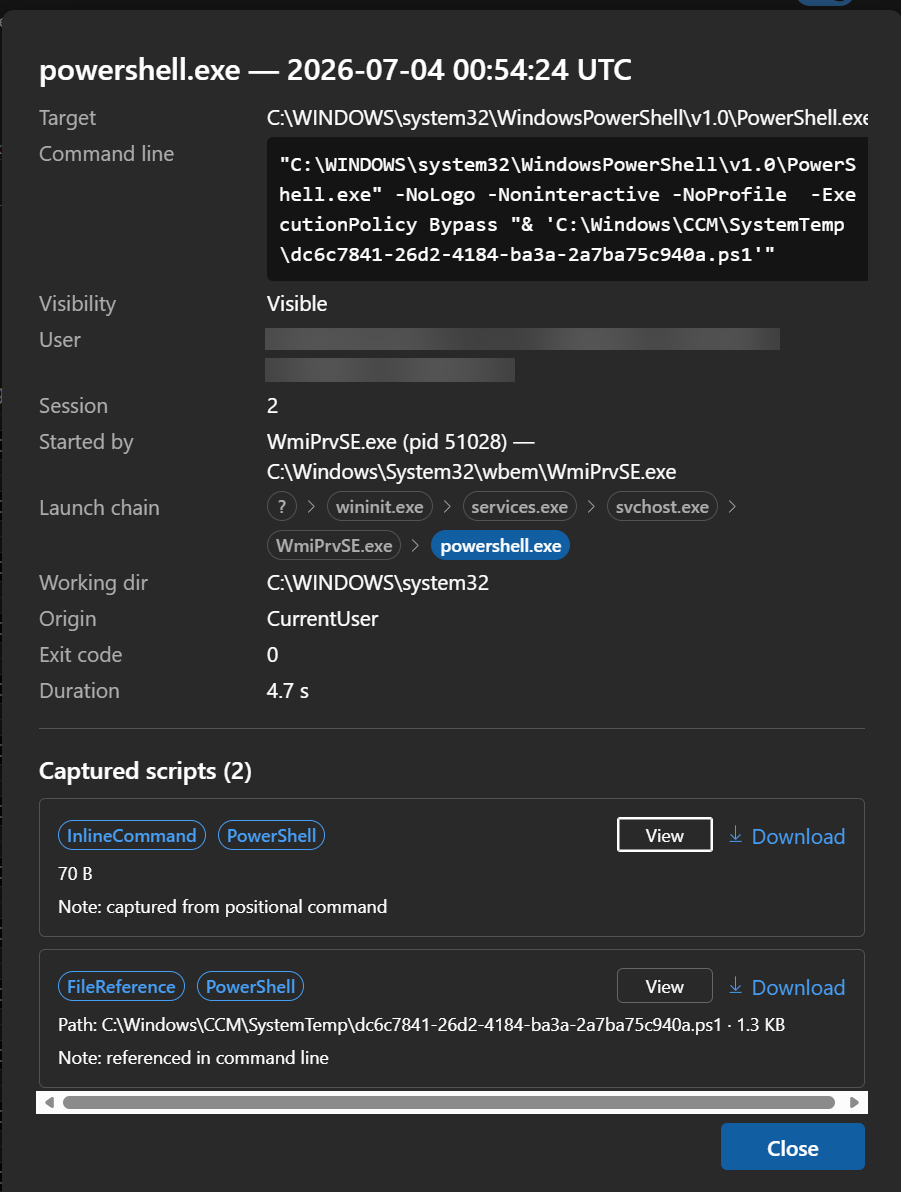
Capturing is only half of it. A folder of a thousand JSON files isn’t insight. So script-warden serve opens a local web viewer (React + Fluent UI, embedded straight into the executable, so it’s still a single file). You get a fast, paginated, searchable trail filtered by interpreter, origin, parent process, and visibility; the full launch chain for any event; and the captured script itself to view or download, including the decoded version of that base64 blob.
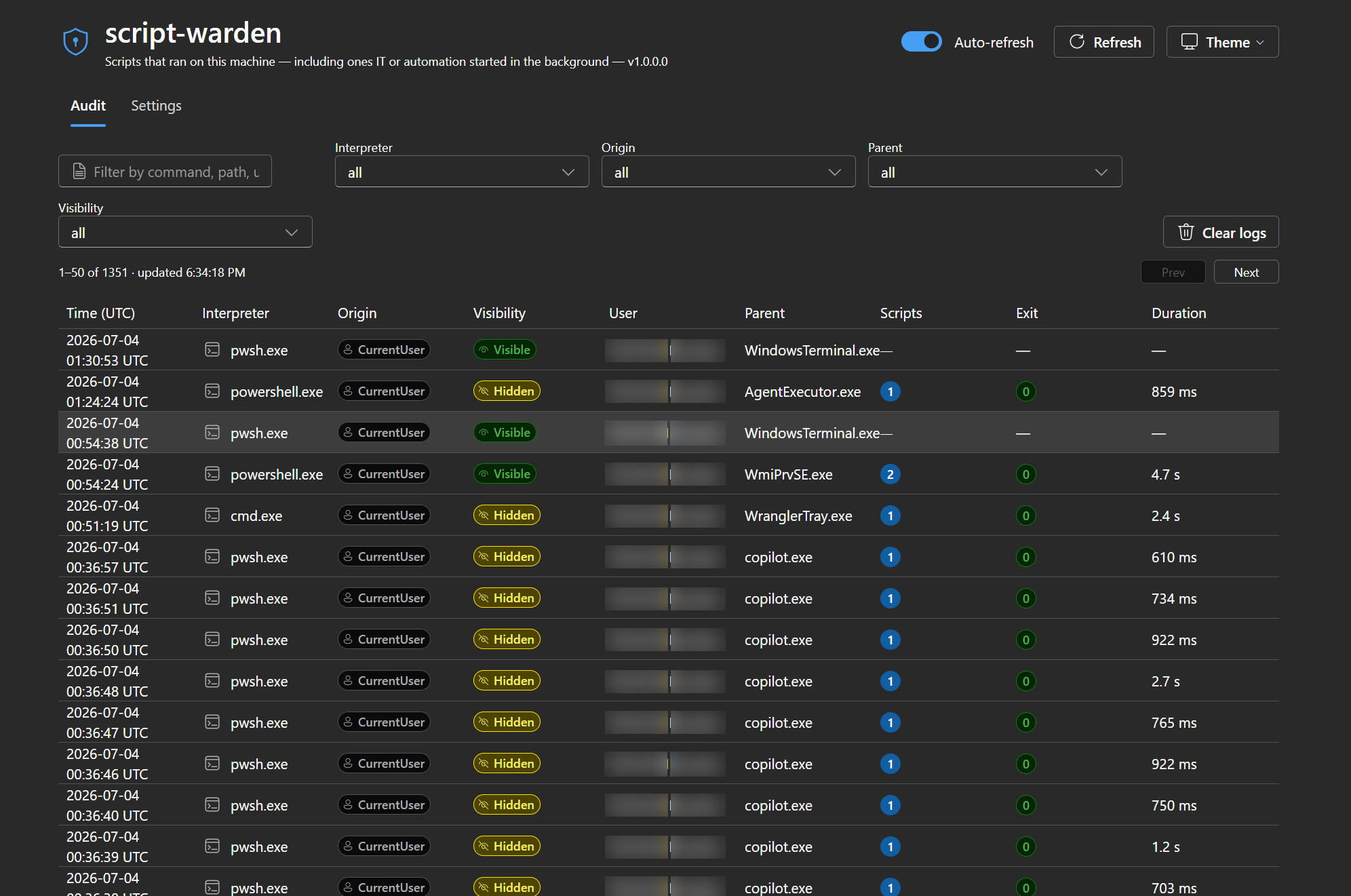
Click any entry to see the full detail: command line, visibility, parent chain, working directory, and the captured scripts themselves.
There’s a deliberate principle running through it: talk about what the user cares about, not the plumbing. You don’t filter by “window-handle state”; you filter by Visible vs Hidden. The interesting engineering lives in the code; the product speaks in your questions.
Why Native AOT
This thing runs on every single interpreter launch on the machine. If it added a few hundred milliseconds of CLR startup each time, I’d uninstall my own tool within a day. .NET Native AOT (ahead-of-time compilation) compiles the whole program to a single native executable: around 4 MB, starts in a blink, no .NET runtime to install or ship. The constraint enforced discipline, too: all P/Invoke uses LibraryImport source generators (compile-time marshalling, no runtime reflection), all JSON uses System.Text.Json source generators (same idea for serialization), and the whole thing publishes AOT-clean. Constraints like these tend to make software better, not worse.
Try It
script-warden is MIT licensed and lives here: github.com/asklar/script-warden.
It’s a single self-contained .exe. Run script-warden diagnose first. It self-tests your data locations, current monitoring state, and simulates a capture so you can see exactly what it does before you commit. Then install starts monitoring (machine-wide, so it prompts for admin once), serve opens the viewer, and uninstall cleanly removes only what it added.
Point it at your own machine and go read what’s been running. You might be surprised.
I write about building with AI agents and the deep Windows internals that make them possible: the stuff that works and the stuff that breaks. Follow me on LinkedIn for more.